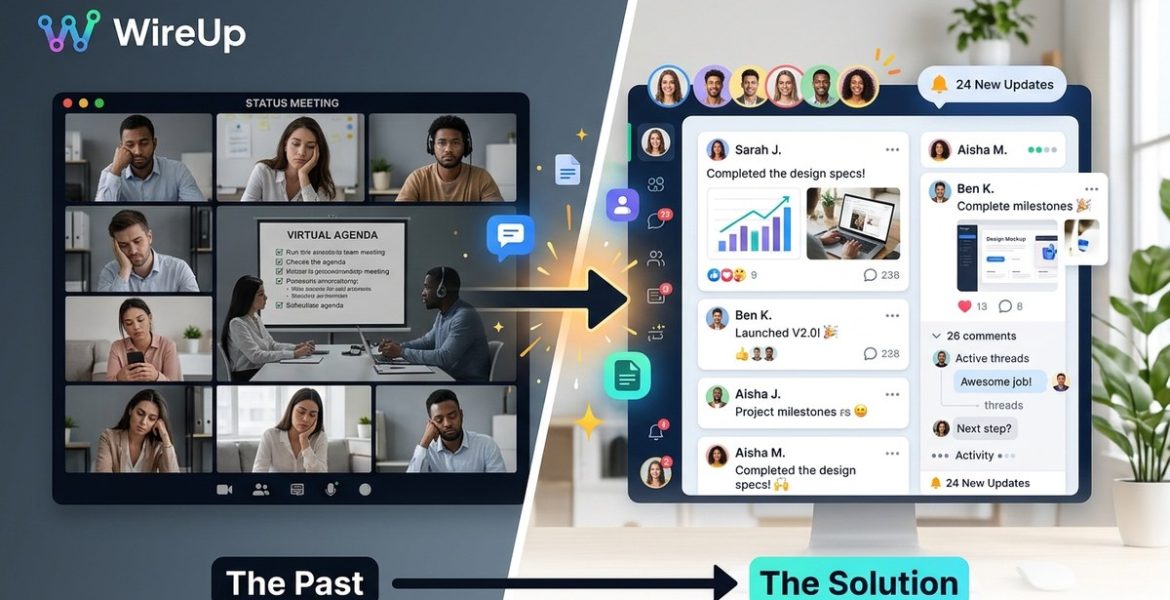
Why Your Remote Team’s Social Feed Is the Ultimate Replacement for Status Update Meetings
On 22 November 2026 by scarlettYour team is spread across three time zones. You have a standing 30-minute status call every morning. The first ten minutes are spent waiting for stragglers. The next five are people asking “what did I miss?” By the time the actual updates start, half the team has already checked out. You know this pain because you live it.
The truth is, most status update meetings are a performance, not a communication tool. They exist because we haven’t found a better way to share progress. But in 2026, we have. Your remote team’s social feed can replace these meetings entirely, and it often does a better job.
Status update meetings waste time because they force everyone to sync at the same moment. A social feed lets team members post updates when they finish work, not when a calendar reminds them. It creates a permanent, searchable record. It reduces interruptions. And it gives managers a real view of progress without pulling people away from their work.
Why status meetings fail remote teams
A status meeting assumes everyone is ready to talk at the same time. In a remote team, that assumption is almost always wrong. Someone is on a tight deadline. Another person just put their kid to bed and is logging off. A third person is in a different time zone where 9 AM means lunchtime.
The meeting happens anyway. People rush through updates. They forget things. They say “same as yesterday” and the manager gets nothing useful. Then someone has to take notes, share them, and follow up. You have effectively created a job that produces a document nobody reads.
What remote teams actually need is a way to share status that works on their schedule, not the calendar’s. That is where a social feed comes in.
How a social feed replaces the status meeting
A team social feed works like a private timeline. People post short updates, share links, ask questions, and react to each other’s work. It is asynchronous. It is permanent. And it is way more honest than a meeting.
Here is what changes when you switch:
- No more waiting for latecomers. Updates are posted when someone is ready. The team reads them when they have time.
- Context is preserved. A meeting note might say “working on the Q2 report.” A social post can include a screenshot, a link to the draft, and a question about the data source.
- Managers get the full picture. Instead of one person talking over others, everyone contributes. The quiet person who never speaks in meetings finally has a voice.
- Search becomes possible. That update from three weeks ago about the client’s new requirements? You can find it in seconds instead of digging through chat logs.
The right way to set up a team social feed
Switching from meetings to a feed takes intention. If you just turn on a tool and say “post updates here,” people will ignore it. Here is a process that works.
-
Pick one home for updates. Do not use Slack for some updates, Teams for others, and email for the rest. Choose a single platform that has a feed-like interface. WireUp is designed for this, but any tool with a chronological feed and reactions can work.
-
Define the update cadence. Ask everyone to post one update per day. It does not need to be long. Two or three sentences plus a link or image is enough. The rule is: post when you finish a meaningful chunk of work, not at a specific time.
-
Encourage reactions, not replies. A thumbs up or a “nice work” is faster than a full comment. It also tells the poster someone saw their update. This builds the habit of checking the feed.
-
Set a “no meeting” window. Replace the daily standup with a 15-minute block where everyone reads the feed. If someone has a blocker, they post it in the feed and tag the person who can help. The tag triggers a notification, but the response can come later.
-
Review the feed weekly. As a manager, scroll through the week’s updates on Friday. You will see patterns. Who is stuck? Who is making progress? Who needs support? You can address these in a short async message instead of scheduling a meeting.
Common mistakes and how to avoid them
Even a good idea can go wrong. Here are the typical pitfalls teams face when moving to a social feed, and how to fix them.
| Mistake | Why it hurts | How to fix it |
|---|---|---|
| No posting guidelines | People post random stuff or nothing at all. | Share a template: “What I did, what I learned, what I need.” |
| Too many channels | Updates get scattered across tools. | Pick one feed and enforce it. Turn off notifications on the others. |
| Managers don’t participate | The feed feels like a surveillance tool. | Managers should post their own updates and react to others. |
| No reaction culture | Posts feel like shouting into the void. | Ask everyone to react to at least three posts per day. |
| Over-posting | The feed becomes noisy and people ignore it. | Cap updates to one or two per person per day. Use threads for follow-ups. |
What to do when someone misses the feed
Sometimes people forget. Or they are on vacation. Or they had a chaotic day and did not post. That is fine. The feed is not a punishment.
Here is how to handle it without creating a new meeting:
“If someone misses a day, do not call them out in a meeting. Send a friendly async message. Something like ‘Hey, saw you did not post yesterday. Everything okay?’ Most of the time they just forgot. If it becomes a pattern, address it during a one-on-one.”
This approach keeps the culture positive. The feed is a tool for transparency, not a surveillance system.
How to measure if the switch is working
You will know the feed is working when you see these signs:
- People post updates without being reminded.
- Team members start asking questions in the feed instead of scheduling meetings.
- New hires catch up on the team’s work by reading past posts.
- Managers have a clearer picture of progress without asking for status reports.
You can also track the number of meetings on your calendar. If you cut from 10 status meetings per week to 2, the feed is doing its job.
The tools that make this possible
Not all social feeds are created equal. You need one that supports rich posts (text, images, links), reactions, threading, and search. Some options include:
- WireUp for a dedicated team social network.
- Basecamp for its message board and automatic check-ins.
- Twist for threaded async discussions.
- Slack with a dedicated channel and a bot that prompts daily updates.
Each tool has strengths. The key is to pick one and stick with it. If you want to understand the full landscape, read our guide on boost remote collaboration with top social network strategies.
A balanced view: when meetings still make sense
The social feed replaces status updates. It does not replace every meeting. Some things still need a live conversation.
Keep a meeting when:
- You need to brainstorm or solve a complex problem together.
- You are having a difficult conversation about performance or conflict.
- You are doing a team retrospective or planning session.
- You are onboarding a new person and want them to meet everyone live.
Everything else can move to the feed. If the meeting’s purpose is “share what you did,” the feed does it better.
Your next move
Start small. Pick one team or one project. Tell everyone to post their daily update in the feed for one week. Cancel the status meeting for that week. See what happens.
Most teams find that the feed gives them more information with less effort. They also find that people are happier because they are not dragged into meetings that do not need to happen.
If you want to go deeper on this topic, check out our article on how to turn your team’s social feed into a real-time knowledge base in 2026. It covers how to make your feed searchable and useful long after the update is posted.
Making the shift permanent
The hardest part of switching to a social feed is the first two weeks. People are used to meetings. They will feel weird not having a daily sync. That is normal.
Stick with it. After two weeks, the feed will feel natural. After a month, you will wonder why you ever held status meetings. After three months, the idea of going back to daily standups will feel like a step backward.
Your team will be more aligned. They will have fewer interruptions. And they will have a written record of every decision and every piece of progress. That is worth the initial discomfort.
Give it a try this week. Pick your tool, set your guidelines, and cancel one status meeting. Then watch what happens.
Leave a Reply