7 Social Network Features That Prevent Burnout in Distributed Teams
On 12 November 2026 by scarlettDistributed work comes with a hidden cost. Your team might be productive, hitting deadlines, and shipping work. But underneath that surface, some of them might be running on empty. Isolation, constant notifications, and the pressure to always be available create a slow drain that leads to exhaustion. The surprising solution? Social network features designed specifically for distributed teams. When used the right way, these tools do more than connect people. They actively prevent burnout by reducing noise, building trust, and creating space for genuine human interaction.
Burnout in remote teams often stems from isolation, unclear boundaries, and information overload. Social network features like status indicators, async video updates, topic channels, and recognition feeds directly address these root causes. By choosing tools that prioritize well-being over constant connection, team leads can create a healthier, more sustainable remote work culture.
Why Remote Teams Burn Out Differently
In an office, you can see when a colleague is struggling. You notice the tired eyes, the slumped shoulders, the quiet lunch at their desk. In a remote team, those signals disappear. A team member can be on the edge of burnout and still show up to every Zoom call with a smile.
The main culprits for remote burnout fall into a few categories. Social isolation makes work feel lonely. The lack of physical separation between work and home blurs boundaries. And the constant stream of chat messages, emails, and notifications creates mental clutter that never stops.
This is where a well designed social network for your team can help. Not another chat app. Not another video tool. A dedicated internal social space that mimics the best parts of office culture without the noise.
The Seven Features That Actually Help
Not all social features are created equal. Some tools add more stress than they relieve. The features below are chosen specifically because they reduce cognitive load, build social bonds, and give people control over their availability.
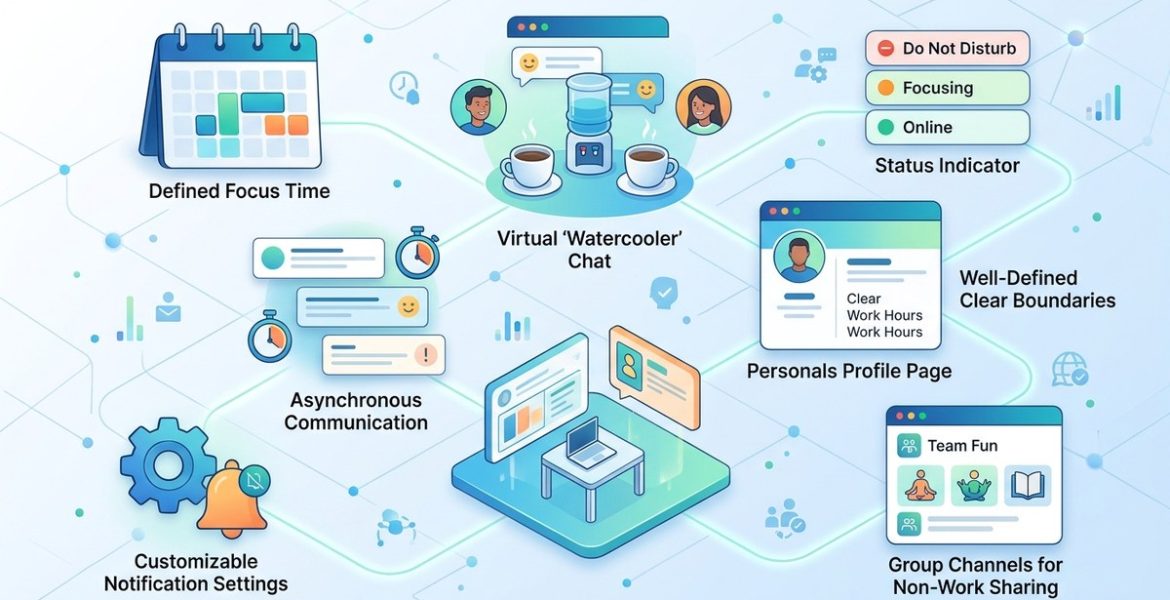
1. Intentional Status Indicators
Standard status indicators show if someone is online, away, or busy. That is fine for basic coordination. But for burnout prevention, you need more nuance.
Look for tools that let team members set a status that communicates their current capacity. For example:
- “Deep work until 2 PM, please use async”
- “Taking a mental health afternoon”
- “Available for urgent questions only”
When people can signal their boundaries without having to explain themselves every time, they feel safer. They do not have to worry about seeming unavailable or rude. The social network handles that for them.
Teams that use detailed status indicators report fewer interruptions. That directly reduces the stress of constant context switching.
2. Async Video Updates
Synchronous meetings are one of the biggest drivers of remote burnout. When your team spans multiple time zones, a 10 AM standup for one person is a 6 PM meeting for another. Over time, that erodes work-life balance.
A social network with built in async video updates changes the game. Instead of gathering everyone for a status meeting, team members record a short video update. Others watch it when it fits their schedule.
This feature preserves the human element of seeing a face and hearing a voice. But it removes the pressure of real time attendance. People feel connected without sacrificing their evenings.
For more ideas on reducing meeting overload, check out our guide on how remote managers can reduce meeting overload across time zones.
3. Topic Based Channels Instead of Group Chats
Group chats are burnout machines. They demand constant attention. Miss a few hours and you come back to hundreds of messages. The anxiety of catching up is real.
Topic based channels solve this. Instead of one giant chat for the whole team, conversations are organized by subject. Design feedback goes in one channel. Watercooler talk goes in another. Project updates live in a dedicated space.
People subscribe only to the channels that matter to them. They can mute the rest without guilt. This drastically reduces information overload.
A table can help clarify the difference:
| Feature | Group Chat | Topic Channels |
|---|---|---|
| Noise level | High, all messages in one stream | Low, only relevant messages |
| Pressure to read | Must catch up on everything | Can scan or skip |
| Boundaries | Hard to disconnect | Easy to mute or leave |
| Context | Lost in scrolling | Clear by channel name |
4. Recognition and Shout Out Feeds
Burnout often comes from feeling invisible. When you work remotely, it is easy to feel like your efforts go unnoticed. A dedicated feed for shout outs and recognition changes that.
Team members can post a quick thank you or highlight someone’s help. These small moments of appreciation build a sense of belonging. They also create a positive record that people can look back on during tough weeks.
The key is that this feed is separate from work updates. It is not buried in a project channel. It is a visible, celebrated space.
5. Focus Mode and Do Not Disturb Settings
A social network for work should not demand your attention 24/7. Look for tools that offer a focus mode. This feature silences all non critical notifications for a set period.
Some platforms allow you to schedule focus hours. During that time, only direct messages from your manager or urgent alerts come through. Everything else is queued.
This puts the control back in the hands of the team member. They decide when they are available for social interaction and when they need to concentrate.
6. Virtual Watercooler Spaces
Watercooler moments are not just about fun. They build the social bonds that protect against isolation. A virtual watercooler is a dedicated channel where work talk is banned. People share photos of their pets, weekend plans, or a new recipe they tried.
The trick is to make this space optional but welcoming. Some people love it. Others prefer to stay quiet. Both are fine. The goal is to provide a low pressure way for team members to connect as humans, not just as coworkers.
For more on building genuine connection, read our article on how to create a social network environment that fosters genuine team connections.
7. Searchable Knowledge Repository
One of the most stressful parts of remote work is not knowing where to find information. You end up asking the same questions over and over. That creates frustration for everyone.
A social network with a searchable knowledge base solves this. When someone asks a question in a channel, the answer becomes part of the permanent record. New hires can search for answers instead of interrupting senior team members.
This feature reduces the mental load on everyone. It also prevents the burnout that comes from being interrupted constantly with the same questions.
Common Mistakes That Make Burnout Worse
Even with the right features, teams can fall into traps. Here are three mistakes to avoid.
- Forcing participation. Mandatory social activities feel like another meeting. Let people engage on their own terms.
- Too many channels. Start with a small number of topic channels. You can always add more later. Too many at once creates confusion.
- Ignoring time zones. If your team spans the US, a 3 PM ET event is a lunchtime event for someone in California and a late evening event for someone in Europe. Record everything.
A Practical Process for Implementation
If you are ready to introduce these features to your team, follow these steps.
- Audit your current tools. List every communication tool your team uses. Identify which ones create noise and which ones create connection.
- Choose one platform. Do not try to add five new tools at once. Pick a social network that combines multiple features in one place.
- Set clear norms. Explain how status indicators work. Define which channels are for work and which are for social. Establish expectations around response times.
- Pilot with a small group. Test the features with a trusted subset of the team first. Gather their feedback before rolling out to everyone.
- Review after 30 days. Ask your team how the new tools are affecting their stress levels. Adjust based on their input.
For a deeper look at choosing the right platform, see our guide on 7 essential social networking features every remote team needs in 2026.
“The best social network for a remote team is the one that gives people permission to disconnect. When you design for boundaries instead of constant connection, you prevent burnout before it starts.”
How to Measure Success
You cannot manage what you do not measure. Track these indicators to see if your social network is actually reducing burnout.
- Response time expectations. Are people responding to messages outside of work hours less often?
- Meeting count. Has the number of synchronous meetings dropped since introducing async updates?
- Employee feedback. Run a short anonymous survey asking about stress levels and sense of connection.
- Engagement in social channels. Are people using the watercooler space? Do they post shout outs?
If you see improvements in these areas, you are on the right track.
Building a Culture That Supports the Tools
Tools alone will not fix burnout. The culture around them matters more. Here is a bulleted list of cultural shifts that make social network features effective.
- Encourage managers to model healthy boundaries. If a leader sends messages at 10 PM, the team will feel pressure to reply.
- Celebrate people who use their status indicators honestly. Thank the person who sets “focus mode” instead of criticizing them.
- Make recognition a habit. Set a weekly reminder to post a shout out.
- Protect the watercooler. If someone posts work in the social channel, gently redirect them.
For more on building culture, read our article on how to build a thriving remote team culture with social networking.
The Real Goal Is Sustainable Connection
The seven features in this guide share one goal. They help your team stay connected without burning out. Connection does not mean constant availability. It means knowing that your teammates are there when you need them and that you have space to recharge when you do not.
As you evaluate social network tools for your distributed team in 2026, keep this principle front and center. The best tool is the one that respects your team’s time, energy, and humanity. Choose features that give people control, not features that demand more of their attention.
Start small. Pick one feature from this list and introduce it this week. See how your team responds. Then add another. Over time, you will build a social environment that supports well being instead of draining it.
Your team deserves a workspace that helps them thrive, not just survive. The right social network features can make that happen.
Leave a Reply